POS Sales Receipt empty

Hi,
Last night I upgraded to 18.3 version from 18.2. I noticed something, when I was trying to open a receipt (POS ###) inside item inventory the result was an empty space and the only thing that appeared was the "Sales receipt", the date-time and not even the title "Sale ID:"
Anyone had the same issue?
Comments
8 comments
Can you send the following:
1. A screenshot of the page before you click the link
2. Exact url after you click
3. If you have recently changed SALE ID PREFIX in store config
2. http://192.168.0.110/irm/index.php/sales/receipt/2882
3. No.
I think you need to upgrade your php version (Our minimum php version is 7.3). Trying the following debug info and let me know the error
Open up index.php in the phppos root folder:
FIND:
define('ENVIRONMENT', isset($_SERVER['CI_ENV']) ? $_SERVER['CI_ENV'] : 'production’);
REPLACE:
define('ENVIRONMENT', isset($_SERVER['CI_ENV']) ? $_SERVER['CI_ENV'] : ‘development’);
open application/config/database.php
FIND:
$db['default']['db_debug'] = FALSE;
REPLACE:
$db['default']['db_debug'] = TRUE;
Then see the errors.
Do NOT forget to undo these changes afterwords.
Chris,
:~$ php -version
PHP 7.4.3 (cli) (built: Aug 13 2021 05:39:12) ( NTS )
Copyright (c) The PHP Group
Zend Engine v3.4.0, Copyright (c) Zend Technologies
with Zend OPcache v7.4.3, Copyright (c), by Zend Technologies
Still I do that?
Yes, still do that, it is very possible something didn’t get copied also
Found this: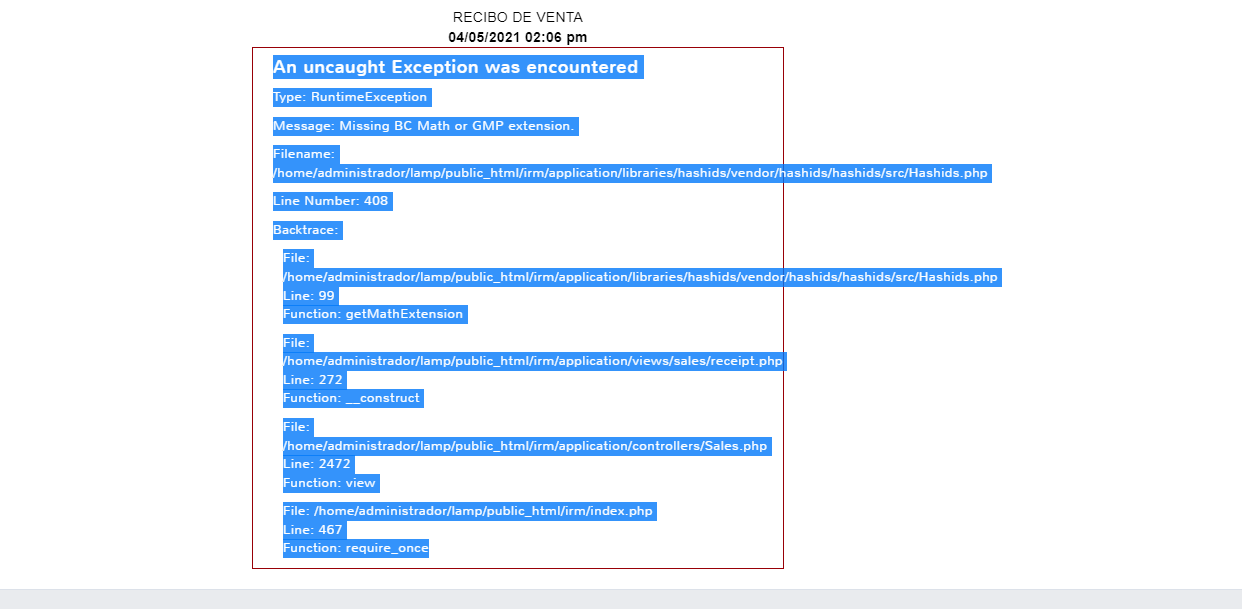
We added a feature to the receipt where we hae a secure link that you can email/text to customer so they can view receipt easily. You are missing BC MATH OR GMP extennsion for php for it to work properly
you have 2 options:
1. install BC Math extension for php (https://stackoverflow.com/questions/3400362/how-to-install-bcmath-module)
2. in application/views/sales/receipt.php
FIND
if (version_compare(PHP_VERSION, '7.2', '>='))
REPLACE
if (FALSE && version_compare(PHP_VERSION, '7.2', '>='))
Chris,
Done the 1. and it works like a charm.
Thank you.
Please sign in to leave a comment.