Customer Quick Add to Work Orders?

is these possibly coming to Work Orders?
- Is it possible to "Customer Quick Add" in Work orders?
- Just same way Quick add as in Sales interface.
- Just same way Quick add as in Receiving interface
is these possibly coming to Work Orders?
Comments
14 comments
This has been added and being rolled out now.
it seems POS development has stopped. No update for many months
We do minor releases weekly. Our next major release is about 3 weeks away.
any plans to add point 1. Customer Quick Add" in Work orders?
I still use version 18.0, because no reason to update. If Point 1. added, i will update .
For customer quick add do you want a modal dialog to put in customer info OR do you want to just start typing name and click Add New XXX
Same as in SALES window: just start typing name and click Add New XXX
Nice, but when i add customer and try to print work order , i get "HTTP ERROR 500" in your demo website
Can you send a video of how you are priting the work order? I Am not seeing an issue. I can reproduce the error if I change the url after printing a work order, but want to know how you do it in UI.
it happens when i add new customer by Quick Add. And then add product. and print Work Order. If i add old customer, everything goes well
I have fixed. Will be deployed in 10 minutes
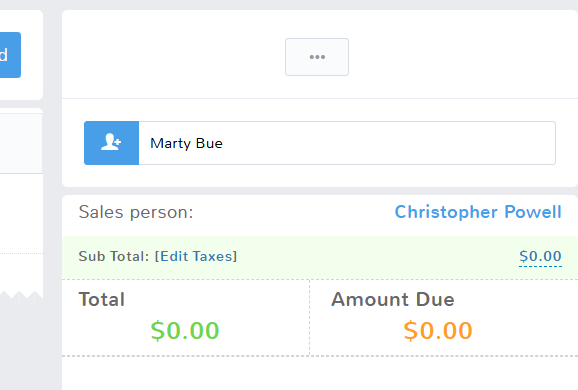
When typing in the customer name into the sales invoice, for customers not in the system, you click Add New. And it opens the new customer page (I have quick add disabled to make sure my guys seer ALL the important customer information on one page instead of a tabbed modal to make sure they don't skip anything.
But when the new customer page opens, the name you typed in to search initially doesn't carry over.
It seems redundant to have to retype it every time. Would it be possible to have the customer's name, i.e. Marty Bue, typed into the search field, carry over automatically into the new customer add by default if typed in?
Typed In:
No Result, Add New Clicked:
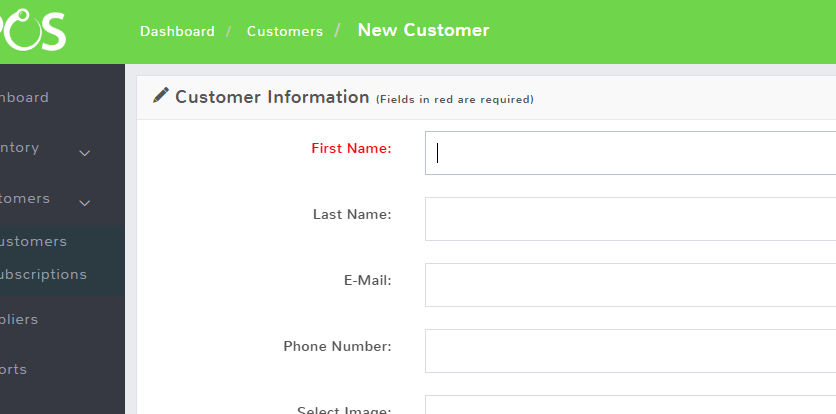
^ Typed In Name Doesn't Carry Over ^
Also, is there a way to make the last name required also? I have an employee in particular who skips last names all the time despite being told it's required by us.
Here is video on adding customer from sales screen
https://www.dropbox.com/scl/fi/ivzzrqvj8p18wagi5tkbn/Screen-Recording-2024-04-29-at-1.41.55-PM.mov?rlkey=vv51u1tf9ijn2dr05sc04zjz5&dl=0
We do not have a way to require last name right now
Since you type the name into the customer search box of the invoice as the first step, to see if they already exist in the system, the question was if there was a way to have the typed in name carry over to the new customer screen so you don't have to retype it a second time every time.
The only way is via Enable Customer Quick Add then you would have to click the pointer icon next to the customer to have it carry over
Please sign in to leave a comment.